MyEd BC Parent Portal
MyEd BC is a secure, web-based student information management system. The system manages all facets of student data –
from attendance to conduct, grades to schedules, and special education.
School District No 8 (Kootenay Lake) has been using MyEducation BC since 2015. We are now implementing the Family portal
so parents, teachers, and administrators can work together and communicate more effectively and efficiently.
Portal
MyEd BC is a secure, web-based student information management system. The system manages all facets of student data – from attendance to conduct, grades to schedules, and special education.
School District No 8 (Kootenay Lake) has been using MyEducation BC since 2015. We are now implementing the Family portal so parents, teachers, and administrators can work together and communicate more effectively and efficiently.
As a parent/guardian, you can use one login to securely access the information for all of your children from just about anywhere. With MyEd BC, you can view:
- Family contact and emergency information.
- Academic information: See real-time information about to your child’s academic achievement. Receive important documents like progress reports and report cards.
- Conduct and attendance information: Sign up for email notifications when new information is available.
- Calendar events: Color-code events to see at a glance what each family member is doing.
MyEd BC protects your student's information with the same advanced technology your bank uses to protect your financial accounts. Rest assured that users only have access to information they need, and nothing more. We have carefully configured the system to ensure that your student’s information is confidential and can only be retrieved by you – the parent/guardian – and authorized school personnel.
You can only view, not edit your child’s demographic data. If you find information that is outdated or incorrect, notify your child’s school to correct any errors.
You can log on to MyEd BC's Family Portal from any computer that connects to the Internet. This lets you access the system from anywhere – your home and your office.
- Open your browser to connect to the Internet.
- Go to https://www.myeducation.gov.bc.ca/aspen/logon.do
- Enter your Login ID and Password.
- The first time you log on, you will be prompted to change your password. After this is completed, the Parent Portal home page will display.
If you lost your Login ID or password, or if you never received them, contact your child’s school.
From any page, click Set Preferences in the upper-right corner of the screen.
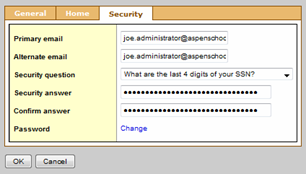
Here you can set several of your user preferences, including your:
- Password
- Email address
- Appearance of your home page
From your Home tab, you can access the four areas of the system. Click a tab to view information for each of the students for whom you are responsible.
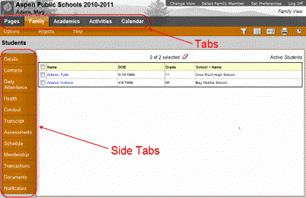
After you click a tab, side-tabs appear on the left side of the page. Click the side-tabs to view detailed information.
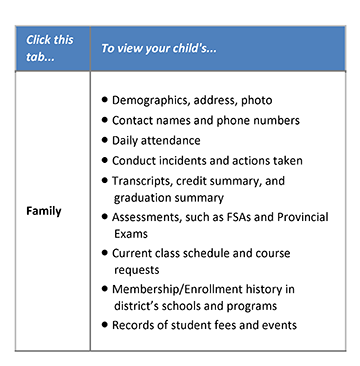
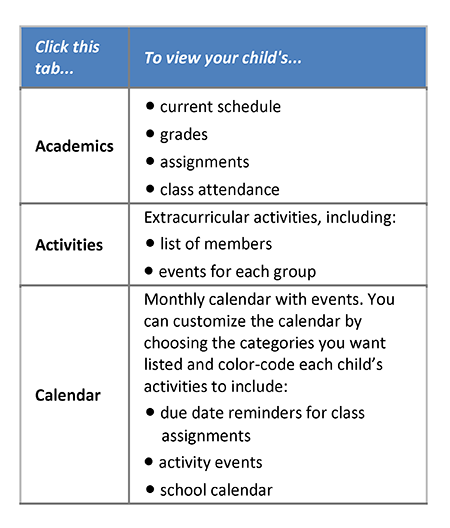
MyEducation BC is easy to navigate. The data is secure and view-only. Feel free to explore. If you have a question about how to do something, go to the Help menu for the following options:
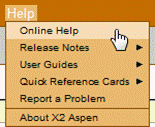
Online Help:
- Open Online Help, then navigate to Using the Student and Family Portal. A table of contents, index, and search feature make it easy to find the information you need.
- User Guides: Open, download, and print a PDF version of Using the Family Portal.
- Quick Reference Cards: Select a topic to view a quick reference card.
- If you still have questions, contact your child’s school.